
GREYCTF 2022 – rev/angry-robot
The challenge asks you to reverse and find a key for 100 different binaries…
I wasn’t planning on doing a write-up for this challenge, but I saw all the other write-ups for this one all had similar approaches. I wanted to provide an alternative method. One that I think is both a little bit clever and at the same time, not so much.
Prompt
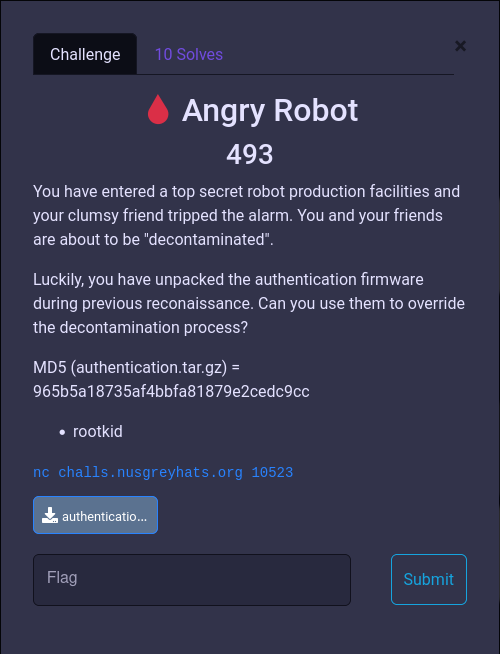
Problem Description
The provided file contains 100 ELF binaries, each that accepts a string input and produces an exit code of either 0 or 1.
$ tar xvzf ../authentication.tar.gz | wc -l
100
$ ls
03e73f2bd4c480b209caa321eb3e2eb974b680e2ec7cbada8cfd457375eaa3c0
04480e6a6ad345bf50f4f428f802656264d4738a000270d8967734cecd0ba2a9
08d4a97677fd1c8d14b069b9922518e5c7a680b67417990d998c41357d4c7c14
1136ab8398d16581aac4940f28fc05860d8272979e9452504eebd62f42ef0128
12bd66b81778b34fcdfd9046e2818236dbae26f9a96a640a1c9812335e5c969b
...
$ ./03e73f2bd4c480b209caa321eb3e2eb974b680e2ec7cbada8cfd457375eaa3c0
aaaaaaaaa
$ echo $?
1
When connected to the socket, it prompts us for the key for one of these binaries (unfortunately, I no longer have the actual output from the socket)
Solution
Reversing the Binaries
Let’s open one up in Ghidra.
/* WARNING: Could not reconcile some variable overlaps */

bool main(void)

{
  long lVar1;
  bool is_wrong;
  long in_FS_OFFSET;
  char buffer [31];

  lVar1 = *(long *)(in_FS_OFFSET + 0x28);
  buffer._0_8_ = 0;
  buffer._8_8_ = 0;
  buffer._16_8_ = 0;
  buffer._24_4_ = 0;
  buffer._28_2_ = 0;
  fgets(buffer,0x1e,stdin);
  is_wrong = check(buffer);
  if (lVar1 != *(long *)(in_FS_OFFSET + 0x28)) {
                    /* WARNING: Subroutine does not return */
    __stack_chk_fail();
  }
  return is_wrong == false;
}
The cleaned up main function looks like the above. It allocates and clears a buffer, reads 30 (0x1e) bytes into it, then calls check(). If the key is correct, it returns true and the whole program returns 0.
/* WARNING: Could not reconcile some variable overlaps */

bool check(char *input_buf)

{
  long lVar1;
  char cVar2;
  long in_FS_OFFSET;
  bool ret_val;
  int counter;
  char key [29];
  char key2 [29];

  lVar1 = *(long *)(in_FS_OFFSET + 0x28);
  key._0_8_ = 0x41537474693f694c;
  key._8_8_ = 0x643969454b736c58;
  key._16_8_ = 0x437533504e514732;
  key._24_4_ = 0x4448544f;
  key[28] = '\x44';
  key2._0_8_ = 0x4771545341397059;
  key2._8_8_ = 0x4933477370605a53;
  key2._16_8_ = 0x656454336b6a3755;
  key2._24_4_ = 0x70777646;
  key2[28] = '\x6d';
  ret_val = true;
  counter = 0;
  do {
    if (0x1c < counter) {
      if (lVar1 != *(long *)(in_FS_OFFSET + 0x28)) {
                    /* WARNING: Subroutine does not return */
        __stack_chk_fail();
      }
      return ret_val;
    }
    cVar2 = check_ascii_and_transform((int)input_buf[counter],counter);
    if (cVar2 == key[counter]) {
      cVar2 = check_ascii_and_transform((int)input_buf[counter],(int)key[counter]);
      if (cVar2 != key2[counter]) goto LAB_00401305;
    }
    else {
LAB_00401305:
      ret_val = false;
    }
    counter = counter + 1;
  } while( true );
}
The check() function loops over the input and does some checks and transformations. If any of the checks fail, the ret_val is set to false and returned. If everything is correct, the default value true is returned.
The magic check_ascii_and_transform() function looks like the following:
int check_ascii_and_transform(char character,int pos)

{
  if (('\x1f' < character) && (character != '\x7f')) {
    return ((character * pos) % 0x597 + pos + character) % 0x49 + 0x30;
  }
    /* WARNING: Subroutine does not return */
  exit(1);
}
If the input character is within some range, it returns a value, otherwise the program just exits.
What I also noticed was that the only things different between the 100 binaries were the input length, the two “key” bytes, and the modulo value (0x597 in the above example)
Python
To understand this checking mechanism better, I wrote the function in Python:
def check_and_transform(c: str, i: int):
  if (0x1f < c) and (c != 0x7F):
    return ((c*i) % 0x597 + i + c) % 0x49 + 0x30;
Angr
Like everyone else, I thought it’d be simple enough to just run it through Angr and get the correct key for each binary. However, unlike many others, I had barely any experience with Angr and did not know what I was doing and was not successful. This was what I had tried initially:
#!/usr/bin/env python
import angr
import sys

def main(prog: str, find: int):
  p = angr.Project(prog)

  st = p.factory.entry_state()
  sm = p.factory.simulation_manager(st)

  sm.explore(find=find)

  import IPython
  IPython.embed()

if __name__ == "__main__":
  main("./03e73f2bd4...", 0x40139C) # This was the instruction address that exited with 0
else:
  main(sys.argv[1], int(sys.argv[2]))
People who are familiar with Angr would see this code and shake their heads in disapproval.
A “Clever” Approach
I then had an idea and decided that I might not need Angr to find the correct input.
Looking at the decompiled code, we know that the input bytes are all within the range [0x20, 0x7F). The range of the output bytes can be determined with a little bit of algebra:
The result of ((c*i) % 0x597 + i + c) can be anything, but it gets modulo’d with 0x49 and added 0x30. So the output can only be in the range [0x00,0x50).
Since the input and output ranges were pretty limited, I thought that I might be able to kind of brute force it, it a way.
The main check() function looked something like this in Python:
key1 = bytes.fromhex("4c693f6974745341586c734b456939643247514e503375434f54484444")
key2 = bytes.fromhex("5970394153547147535a60707347334955376a6b33546465467677706d")

for i in range(0x1C):
  a = check_and_transform(input[i], i)
  if a == key[i]:
    b = check_and_transform(input[i], key[i])
    if b != key2[i]:
      print("FAIL")
      sys.exit(1)
print("SUCCESS")
To try to reverse the operations of check_and_transform() function, because there were limited number of inputs and outputs, I created a table that mapped all the possible inputs to the outputs, as well as the reverse:
def check_and_transform(c: str, i: int):
  if (0x1f < c) and (c != 0x7F):
    return ((c*i) % 0x597 + i + c) % 0x49 + 0x30
  else:
    return -1

mapping = []
rev_mapping = {}

# Loop through all possible input
for j in range(0x80):
  output = []
  for i in range(0x80):

    # Calculate check output
    x = check_and_transform(i, j)
    if x == -1:
      continue

    # Append to output
    output.append(x)

    # Add input pair that leads to the output value
    if chr(x) in rev_mapping:
      rev_mapping[chr(x)].append((chr(i), chr(j)))
    else:
      rev_mapping[chr(x)] = [(chr(i), chr(j))]
  mapping.append(output)

print(f"Mapping: {mapping}")
print(f"Reverse Mapping: {rev_mapping}")
At this point of the code:
mapping[i][j]containscheck_and_transform(i, j)rev_mapping[x]contains a list of input pairs(i, j)for alliandjthatcheck_and_transform(i, j)equalsx
$ python 03e73f2bd4...aa3c0.py
Mapping: [[80, 81, 82, 83, 84, ...]...]
Reverse Mapping: {'P': [(' ', '\x00'), ('i', '\x00'), ('4', '\x01'), ('}', '\x01'), ...], ...}
So for example, in the above run, any of the input pairs (' ', '\x00'), ('i', '\x00'), ('4', '\x01'), ('}', '\x01') will result in the value “P” (or 0x80)
From there we can run the algorithm backwards and see which inputs work out:
correct_input = []
for i in range(0x1D):
  possible_answer = []
  for (a, b) in rev_mapping[chr(key[i])]:
    if b == chr(i): # Check to see if it'll pass the first if statement
      for (c, d) in rev_mapping[chr(key2[i])]:
        if d == chr(key[i]):
          possible_answer.append(a)
          break
  correct_input.append(x)
print(correct_input)
The above ended up yielding: [['e'], ['e'], ['5', '~'], ['2', '{'], ['*', 's'], ['/', 'x'], ['b'], ['8'], ['$', 'm'], ['d'], ['-', 'v'], ['2', '{'], ['(', 'q', 'z'], ['a', 'y'], ['a'], ['Y', 'n'], ['7', 'z'], ['1', '\\'], ['g'], ['0', '^'], ['d'], ["'", 'r'], ['8', ''], ['c'], ['/', 'q'], ['j'], ['6', 'k'], ['g', 's'], ['(', 'o']]
Somewhere in there, I must’ve missed a check or two because it was giving me extra input possibilities that did not pass the checks when passed into the original program. Luckily, via experimentation, it seemed like the inputs failed when there were non alphanumeric characters. Adding the check for that further reduced the possibilities.
correct_input = []
for i in range(0x1D):
  possible_answer = []
  for (a, b) in rev_mapping[chr(key[i])]:
    if b == chr(i): # Check to see if it'll pass the first if statement
      for (c, d) in rev_mapping[chr(key2[i])]:
        if d == chr(key[i]) and a.isalnum(): ## Add alphanumeric check
          possible_answer.append(a)
          break
  correct_input.append(x)
print(correct_input)
I then used itertools to get all the final candidates as strings.
import itertools
fin = list(itertools.product(*correct_input))
x = []
for f in fin:
  x.append(''.join(f))
print(x)
$ python 03e73f2bd4...aa3c0.py
['ee52sxb8mdv2qaaY71g0dr8cqj6go', 'ee52sxb8mdv2qaaY71g0dr8cqj6so', 'ee52sxb8mdv2qaaY71g0dr8cqjkgo', 'ee52sxb8mdv2qaaY71g0dr8cqjkso', 'ee52sxb8mdv2qaaYz1g0dr8cqj6go', 'ee52sxb8mdv2qaaYz1g0dr8cqj6so',
...
Now I ran each input through the original binary to find the true answer. This snippet would run each candidate through the binary and check the exit status. If the program exited with exit code 0, we found a solution and we write it to a file.
counter = 0
from pwn import *
binary = "03e73f2bd4c480b209caa321eb..."
for candidate in x:
  p = process(binary)
  p.sendline(candidate.encode())
  stat = p.poll(block=True)
  if stat == 0:
    print(f"{candidate}: {stat}")
    with open(f"{binary}_{counter}", 'w') as f:
      f.write(candidate)
    counter += 1
[+] Starting local process './03e73f2bd4c480b209caa321eb3e2eb974b680e2ec7cbada8cfd457375eaa3c0': pid 100051
[*] Process './03e73f2bd4c480b209caa321eb3e2eb974b680e2ec7cbada8cfd457375eaa3c0' stopped with exit code 1 (pid 100051)
[+] Starting local process './03e73f2bd4c480b209caa321eb3e2eb974b680e2ec7cbada8cfd457375eaa3c0': pid 100053
[*] Process './03e73f2bd4c480b209caa321eb3e2eb974b680e2ec7cbada8cfd457375eaa3c0' stopped with exit code 1 (pid 100053)
[+] Starting local process './03e73f2bd4c480b209caa321eb3e2eb974b680e2ec7cbada8cfd457375eaa3c0': pid 100055
[*] Process './03e73f2bd4c480b209caa321eb3e2eb974b680e2ec7cbada8cfd457375eaa3c0' stopped with exit code 1 (pid 100055)
[+] Starting local process './03e73f2bd4c480b209caa321eb3e2eb974b680e2ec7cbada8cfd457375eaa3c0': pid 100057
[*] Process './03e73f2bd4c480b209caa321eb3e2eb974b680e2ec7cbada8cfd457375eaa3c0' stopped with exit code 1 (pid 100057)
...
Interestingly, the first binary had multiple solutions:
$ ls 03e73*
03e73f2bd4c480b209caa321eb3e2eb974b680e2ec7cbada8cfd457375eaa3c0
03e73f2bd4c480b209caa321eb3e2eb974b680e2ec7cbada8cfd457375eaa3c0_0
03e73f2bd4c480b209caa321eb3e2eb974b680e2ec7cbada8cfd457375eaa3c0_1
03e73f2bd4c480b209caa321eb3e2eb974b680e2ec7cbada8cfd457375eaa3c0.py
Seems like both ee52sxb8mdv2zyan71g0dr8cqjkgo and ee52sxb8mdv2zyanz1g0dr8cqjkgo works for the first binary.
Automating it… kinda
Now, I needed to just repeat this 99 more times, with the rest of the binaries. I started manually going through each one, fixing up the input length, keys, and modulo values in the script. The programs were mostly the same structure, with minor offsets here and there.
I decided to write a Ghidra script. I ended up writing 3 versions of the same script, because some of the binaries had the keys split up in 4, 5, or 6 instructions. The script, after fixing up the correct offsets, would generate a python script that would do what I’ve just done above.
# Create solution script (4)
#@category GreyCTF.AngryRobot

from ghidra.program.model.address.Address import *
from ghidra.program.model.listing.CodeUnit import *
from ghidra.program.model.listing.Listing import *

listing = currentProgram.getListing()

def get_scalar(addr, idx):
    return listing.getCodeUnitAt(toAddr(addr)).getScalar(idx)

offset = 2
offset2 = 4

check_mod = get_scalar(0x4011c0 + offset, 2)
loop = get_scalar(0x401305, 1)

key_0 = get_scalar(0x401228 + offset, 1).toString()[2:]
key_1 = get_scalar(0x401232 + offset, 1).toString()[2:]
key_2 = get_scalar(0x401244 + offset, 1).toString()[2:]
key_3 = get_scalar(0x401252 + offset, 1).toString()[2:]

key2_0 = get_scalar(0x401256 + offset2, 1).toString()[2:]
key2_1 = get_scalar(0x401260 + offset2, 1).toString()[2:]
key2_2 = get_scalar(0x401272 + offset2, 1).toString()[2:]
key2_3 = get_scalar(0x401280 + offset2, 1).toString()[2:]

prog_name = currentProgram.getName()

path = "[redacted]/angry_robot/progs/" + prog_name + ".py"
with open(path, "w") as f:
    f.write("""#!/usr/bin/env python3
from base import solve

check_mod = {}
loop_range = {}

key_0 = bytearray(bytes.fromhex("{}"))
key_0.reverse()
key_1 = bytearray(bytes.fromhex("{}"))
key_1.reverse()
key_2 = bytearray(bytes.fromhex("{}"))
key_2.reverse()
key_3 = bytearray(bytes.fromhex("{}"))
key_3.reverse()
key = key_0 + key_1 + key_2 + key_3
print(key)

key_0 = bytearray(bytes.fromhex("{}"))
key_0.reverse()
key_1 = bytearray(bytes.fromhex("{}"))
key_1.reverse()
key_2 = bytearray(bytes.fromhex("{}"))
key_2.reverse()
key_3 = bytearray(bytes.fromhex("{}"))
key_3.reverse()
key2 = key_0 + key_1 + key_2 + key_3
print(key2)

import os
binary = os.path.basename(__file__).split('.')[0]

solve(check_mod, loop_range, key, key2, binary)

""".format(check_mod, loop.add(1), key_0, key_1, key_2, key_3, key2_0, key2_1, key2_2, key2_3))
I still needed to do a lot of manual work, but with a lot less copy-pasting.
The generated script uses base.py located in the same directory:
#!/usr/bin/env python3

def check(c: str, i: int, check_mod):
    if (0x1f < c) and (c != 0x7F):
        return ((c*i) % check_mod + i + c) % 0x49 + 0x30;
    else:
        return -1

alnum = "abcdefghijklmnopqrstuvwxyzABCDEFGHIJKLMNOPQRSTUVWXYZ0123456789"

def solve(check_mod, loop_range, key1, key2, binary):

    mapping = []
    rev_mapping = {}
    for j in range(0x80):
        a = []
        for i in range(0x80):
            x = check(i, j, check_mod)
            if x == -1:
                continue
            a.append(x)
            #print(f"{chr(i)}{chr(j)} {chr(x)}")

            if chr(x) in rev_mapping:
                rev_mapping[chr(x)].append((chr(i), chr(j)))
            else:
                rev_mapping[chr(x)] = [(chr(i), chr(j))]
        mapping.append(a)

    pw = []
    for i in range(loop_range):
        x = []
        for (a, b) in rev_mapping[chr(key1[i])]:
            if b == chr(i):
                for (c, d) in rev_mapping[chr(key2[i])]:
                    if d == chr(key1[i]) and a in alnum:
                        x.append(a)
                        break
                #x.append(a)
                #print(i, a)
        pw.append(x)
    print(pw)

    import itertools
    fin = list(itertools.product(*pw))
    x = []
    for f in fin:
        x.append(''.join(f))
    print(len(x))

    counter = 0
    from pwn import process
    for candidate in x:
        p = process(f"./{binary}")
        p.sendline(candidate.encode())
        stat = p.poll(block=True)
        p.close()
        if stat == 0:
            print(f"{candidate}: {stat}")
            with open(f"{binary}_{counter}", 'w') as f:
                f.write(candidate)
            counter += 1
This was also my first time writing a Ghidra script. I guess I could’ve use Angr or Ghidra’s CFG analysis to automatically get the offsets from the program.
Anyways, I ended up manually doing this for a couple dozen binaries.
Every now and then, I ran a solve script, which would try to solve the challenge. It would get the binary name from the server, see if we have the solution for it, if so, send it. If not, start over. I was just trying to get lucky.
#!/usr/bin/env python3
from pwn import *

def get_pw(prog_name):
    with open(f"progs/{prog_name}_0", "rb") as f:
        return f.read()

p = remote("challs.nusgreyhats.org", 10523)
print(p.sendlineafter(b"(y/n)\n", b"y").decode())

while True:
    prompt = p.recvline().decode()
    print(prompt)
    prog = prompt.split()[-1]

    try:
        pw = get_pw(prog)
        print(f"{prog} -- Sending password")
        print(p.sendline(pw))
    except:
        print(f"{prog} -- SKIPPING")
        p.close()
        break

#p.interactive()
And after finding the solution for about half of the binaries manually, I did get lucky and the server asked for 5 inputs, which we had the correct responses to.
Flag
The flag is: grey{A11_H4il_SkyN3t}